
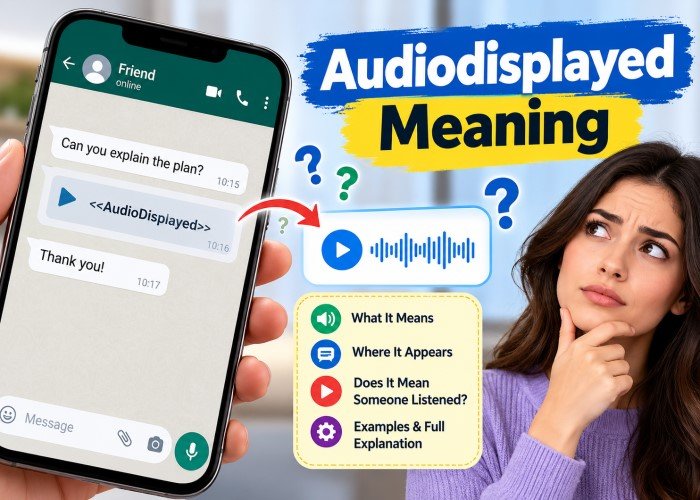
A strange label can turn a simple voice message into a puzzle. You open a saved conversation, find the words Audiodisplayed Meaning and wonder whether someone has heard your recording. Perhaps the label sits between two messages, with no sound file beside it. The good news is that the explanation is simple. The label usually marks audio content in a digital system. It does not, by itself, confirm that a recording was played, heard or saved.
What Is the Audiodisplayed Meaning?
The phrase brings together two familiar words. “Audio” covers recorded voices, music and other sounds. “Displayed” means shown or represented. Together, they describe an audio-related item that a system has placed on a screen or marked in text. That item might be a voice note, a playback button, a sound clip or a placeholder within a saved conversation. There is no universal definition across every app. The safest interpretation comes from the surrounding text and the software that produced it, not from the label alone.
Quick Facts About AudioDisplayed
| Feature | Explanation |
|---|---|
| Type | Technical-style label or placeholder |
| Basic sense | Audio shown or represented |
| Common setting | Chat transcripts and digital interfaces |
| Everyday English word | Not commonly used as one word |
| Proof of playback | No |
| Proof of listening | No |
| Possible forms | AudioDisplayed, audioDisplayed, audio_displayed |
| Best way to check | Inspect the original app or recording |
Why Does the Word Appear in Digital Conversations?
Modern conversations contain much more than written messages. They include pictures, recordings, stickers, video clips and documents. When a system copies a conversation into plain text, it cannot place every media item inside the text itself. Instead, it may use a short marker to show where that item belongs. An audio marker can preserve the order of a conversation even when the recording is stored separately.
Understanding the AudioDisplayed Tag
The format <<AudioDisplayed>> can act as a placeholder in a text transcript. It indicates that audio content belonged at that point. It does not reveal the words spoken, the recording’s length or whether a recipient pressed play. Those details require the original media or a separate record.
Why the Capital Letters Matter
Capital letters inside a joined term are common in software. A developer may choose audioDisplayed as the name of a variable or event. That does not make it an official status used by every service. Even closely matched labels can have different meanings in different systems.
Audiodisplayed Meaning in Chat Transcripts
A transcript is a written account of a conversation. Some transcripts contain the actual words spoken in a recording. Others simply mark that a recording was present. Imagine a chat export that reads, “Can you explain the plan?” followed by <<AudioDisplayed>>, then “Thank you.” The middle marker tells you that audio was part of the exchange. It does not tell you what the speaker said. Without the recording, treating that marker as a complete transcript would be a mistake.
Voice Notes and Messaging Apps
Messaging services can show an audio bubble, a waveform or a play symbol. These visible controls allow someone to open a recording. Their presence alone does not prove that the sound started. Individual services have their own delivery, read and playback indicators, and those rules can change. Do not treat AudioDisplayed as an official WhatsApp, Instagram or Snapchat listening receipt. If it turns up in a copied conversation, a third-party export tool may have supplied the wording. Check the app’s own indicators before making any judgement.
AI Tools and Automated Conversations
Voice-enabled assistants may work with both spoken and written content. When a conversation is converted into text, an audio marker may preserve the position of a spoken contribution. An automated transcript may also include a separate written version of the speech. That text is different from the marker: one provides words, while the other identifies an audio element. Neither should be confused with proof that another person listened.
Displayed Audio Versus Played Audio
The difference between displaying and playing is central. A voice note may load onto a screen as soon as someone opens a chat. It can remain there without a single second of sound being produced. Playback begins only when the software starts playing the recording.
| Status | What it tells you |
|---|---|
| Displayed | An audio item was presented or marked |
| Delivered | A service recorded delivery under its own rules |
| Opened | An item or conversation was opened |
| Played | The recording began playing |
| Heard | A person actually listened, which a label alone cannot establish |
Can a Playback Indicator Prove Listening?
Even a playback signal has limits. Someone might press play with the sound muted, leave the room or stop after a few seconds. If the message matters, direct confirmation is more reliable than guessing from a small icon.
Does Audiodisplayed Mean Your Voice Note Was Heard?
No. Seeing the label does not prove that a recipient heard your message. It also does not confirm that the recording was downloaded, forwarded, deleted or recorded through a microphone. These are separate actions that require separate evidence. A friend may not reply to a voice message, or a colleague may miss an important instruction. The label cannot settle what happened. You need the service’s proper playback details, or a simple follow-up message, to clarify the situation.
Is AudioDisplayed a Real Word or Internet Slang?
“Audio displayed” is normal English when written as two words. The combined form is better understood as a system-style label. It is not a widely accepted slang expression, secret code or standard abbreviation. People may write the term in lower case, with a capital letter in the middle or with an underscore. These spellings are familiar in software design, but their exact roles depend on the creator. In everyday writing, “audio message shown” or “voice note attached” is often clearer.
What Should You Do When You See the Label?
Begin with its location. Is it inside a live chat, a text export, a saved file or a technical record? Next, check whether a recording is attached nearby. A missing recording in an exported document does not automatically mean that the original file has been lost. If you can open the original conversation, look for the voice note and the app’s own controls. For a work transcript, ask for the source recording if the spoken details matter. When editing a document, replace an unclear marker with a simple note such as “[Voice message attached]”, but keep the original wording in records where exact accuracy is important.
If the Audio Will Not Play
Check your device volume, internet connection and file access first. Then reopen the original message or request the recording from its sender. A plain-text marker cannot be played because it contains no sound by itself. Avoid installing unknown software that promises to recover audio from the label alone.
Keep Important Records Intact
For legal, workplace or safeguarding matters, save the original conversation and media files where permitted. Do not edit timestamps or replace evidence with a rewritten transcript. An accurate record makes it easier to establish what was sent and what remains unconfirmed.
Is It Related to Audio Description or Accessibility?
Not usually. Audio description is a separate accessibility feature that narrates important visual details in a film or video. A transcript marker, by contrast, simply identifies an audio element. Captions and speech transcripts are different again. Captions present spoken words and sometimes meaningful sounds as text. A transcript preserves speech in written form. An AudioDisplayed tag does neither unless another part of the document supplies the content. Understanding these differences prevents confusion when using accessible media.
Frequently Asked Questions
What does Audiodisplayed mean in simple words?
It generally means that an audio item was shown or represented in a digital conversation or document. The exact use depends on the software.
Does it mean someone listened to my message?
No. A displayed audio item is not proof of playback or listening. Check the proper status in the original app.
Why do I see <<AudioDisplayed>> instead of a recording?
A text-only copy may use that marker in place of an audio item. The recording might still be held separately.
Is the label an error or a warning?
Not necessarily. It often acts as a normal marker. A fault is more plausible if the original player fails or the media file is damaged.
Can I convert the label into spoken words?
No. The label holds no speech content. You would need the original sound file and, if required, a transcription tool.
Conclusion
The Audiodisplayed Meaning is straightforward once you know what the label can and cannot show. It usually identifies audio content in a chat, transcript or technical interface. It does not confirm playback, listening or any other action by the recipient. For a dependable answer, return to the original message, inspect the available media and use the app’s own status details. A short technical marker is helpful for keeping a conversation in order, but it cannot tell the whole story.
